


C
1 I/O monitoring
Press one time  ,That is to enter the input signal monitoring screen, press the top and bottom keys can switch before and after the monitoring screen.


Press two times  That is to enter the output monitoring screen, press the upper and lower keys to switch the monitoring screen.


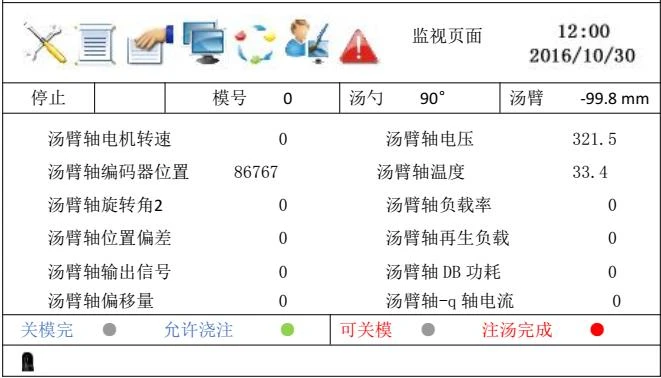
Press 3 times  That is to enter the servo monitoring page, this page for the Servo Motor State Monitoring, real-time monitoring speed, current, voltage, temperature and other data. Press the up and down keys to switch the monitor screen.

2 Alarm Code
Press  Once,That is to enter the alarm recording screen, the screen can record the last 15 alarm information. Press the up and down keys to switch the monitor screen.

 one more time Can enter the automatic cycle time recording screen, this screen can record the most recent 5 mode cycle time.
Chapter 4 Program Update
1 Manual Program Update
Plug the USB stick into the USB port on the right hand side of the control, press the Emergency Stop Button, power off and restart, go to the home page, then go to the 2014 password page to check the version number is correct (you can not pull out the USB stick before entering the home page) .
2 Master Program Update

Insert the Thumb Drive, click  Key into the program page, follow these steps to upgrade
(1) refresh: click the “Refresh” button on the right, if no USB flash drive is detected, the left side of the light is still gray; detected USB drive, the left side of the light is green, and then click the update button.
(2) update: if the left light turns green to red, the running light on the host is flashing at a high rate and the percentage of system updates that occur is moving. If the percentage changes to 100% , the program is updated and a prompt appears at the bottom of the screen (update complete!) .
(3) pop-up: then click the pop-up button, pop-up has been inserted U disk, the left light from red to gray. At this point you can pull out the U disk, the end of the host update.
* Note: 1. The host program update time is approximately 2 minutes.
2. Once you hit the pop-up Button or unplug the USB Stick, you must restart the system to refresh the detected USB stick again.